

Posted
Hi.
I am observing nothing to happen after choosing Export Settings ... .
IOW, the dialog does not appear.
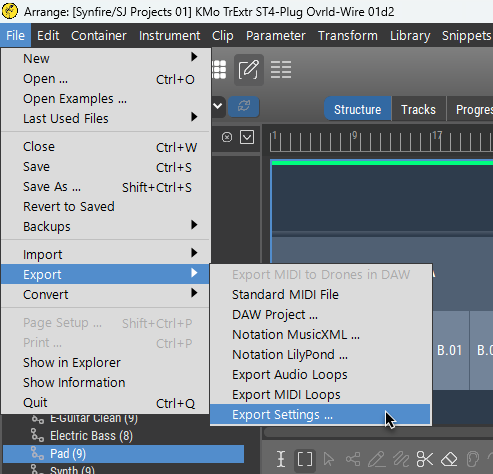
I have seen the dialog in the past, but it's not coming up now.


Mo., 29.12.2025 - 20:24 Permalink
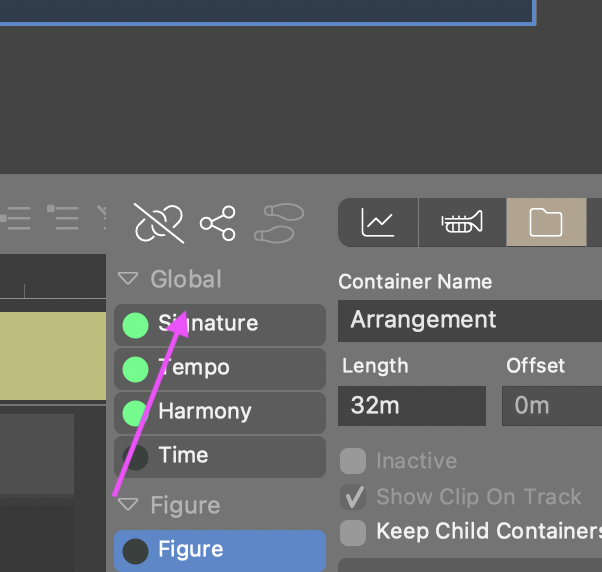
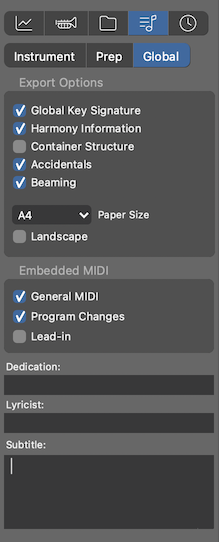
The pic above is helpful, now I know where the intention to go is.
However, I just observed the menu item to result in this display:
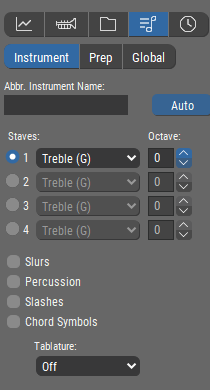
You can see that 'Instrument' is active, rather than 'Global'.
If the menu item cannot reliably take the user to the correct place, then IMO it is not helpful.
An alternative would be to pop up a dialog with a clear verbal explanation of where to go.
Of course, if it could reliably go to the correct place, that would be good!
Di., 30.12.2025 - 11:24 Permalink
Jumping to Global is a good idea. Export options however can also be set for each instrument
Di., 30.12.2025 - 14:06 Permalink
Of the displays shown by the 3 tabs: Instrument, Prep, Global
only on the one for Global does the word "Export" appear.
Are these all export settings?
I can see that as potentially logical, as they are all "under" the flying note icon.
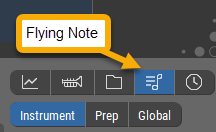
However, I think it is extremely counter-intuitive to use the word "Export" on one-and-only-one of the tab displays
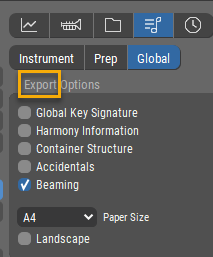
if in fact all 3 of these are export displays (?).
I suggest the word "Export" either be used 3 times (once in each display), or zero times, in which case being "under the Flying Note" serves as the indication.
Or, you could put the word "Export" as a label above all 3 of Instrument, Prep, Global if that is what they are all for.
Finally, pop-up help on those 5 icons (of which the flying note is the 4th) would be very helpful (I see none here myself).
BTW, figuring out icon = flying note = export was far from immediate. I actually do think this is a good icon, but having pop-up help that says "Export Settings" would have saved some head-scratching time for sure.
Di., 30.12.2025 - 16:21 Permalink
These are all notation export settings hence the icon. The global settings happen to be used also for midi file export