Posted
Hi.
In the middle of a project I decided to use a Factory to generate some extra bass lines.
I liked the results, but found that the new extra bass lines were all quieter than the already existing bass lines in the project.
It turns out that the existing bass lines have velocity values in Figure in the vicinity of 122, whereas the new extra bass lines from the Factory have velocity values in Figure in the vicinity of 100.
I realize now that I should have set up the Factory with a higher velocity range.
Given that I didn't though, is there any way to linearly or proportionally raise the Figure-based velocity values in the new extra bass lines? (other than editing every single element in Figure, which would be worse than starting the process over from scratch)
If this is not currently possible, perhaps a future enhancement of this type could be considered.

Mo., 02.02.2026 - 02:52 Permalink
Hi sj. Andre, I've actually encountered this a lot with importing figures from random midi. The velocities are way off.
I'd take this one step further and say I would like some type of global normalization for velocities. Maybe a button on each Channel, we pick a velocity Baseline number of choice. If the track is not empty, then the imported figure can use interpolation to match with the surrounding figures' velocities.

Mo., 02.02.2026 - 10:52 Permalink
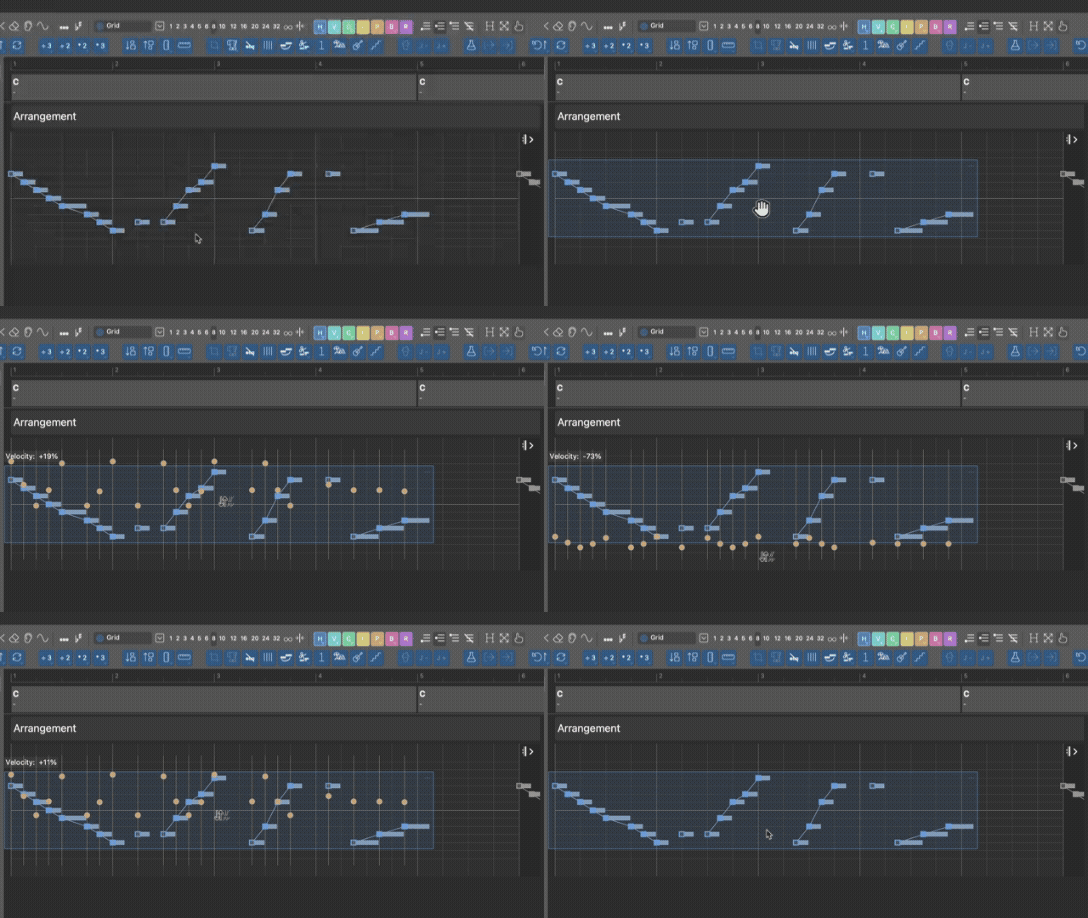
Select figure in phrase editor, select all with command-a, hold the command key (dynamics pointer should show), and move mouse to proportionally change all velocities