

Posted
Hi.
The Help for Variation states that there is a total of 25 transformations (e.g. Invert, Flip, Transpose, Stretch, Reverse, etc.) available.
I observe today when editing a Variation that there are only 11 positions (between 0.0 and 1.0) to which I can set a variation "point".
Is the help mistaken about the number? Does the number of available variations vary depending on conditions? Is it incorrect to expect a correspondence between the point positions and the transformations?
Also, would it be possible to post a complete list of the transformations?
Thanks.

Sa., 21.02.2026 - 21:39 Permalink
Thats just the grid of the slider widget. Values are interpolated linearly
Sa., 21.02.2026 - 21:41 Permalink
Value: 0.0 Transformations = yourself
Value: 0.01 Transformations = invertedUp
Value: 0.04 Transformations = invertedDown
Value: 0.08 Transformations = variateTransposeUp
Value: 0.12 Transformations = variateTransposeDown
Value: 0.15 Transformations = variateTransposeUpMore
Value: 0.19 Transformations = variateTransposeDownMore
Value: 0.23 Transformations = reverseValues
Value: 0.26 Transformations = upsideDown
Value: 0.3 Transformations = reverse
Value: 0.34 Transformations = reverseValues upsideDown
Value: 0.38 Transformations = reverseValues variateTransposeUp
Value: 0.41 Transformations = reverseValues variateTransposeDown
Value: 0.45 Transformations = reverseValues variateTransposeUpMore
Value: 0.49 Transformations = reverseValues variateTransposeDownMore
Value: 0.52 Transformations = upsideDown variateTransposeUp
Value: 0.56 Transformations = upsideDown variateTransposeDown
Value: 0.6 Transformations = upsideDown variateTransposeUpMore
Value: 0.63 Transformations = upsideDown variateTransposeDownMore
Value: 0.67 Transformations = reverse
Value: 0.71 Transformations = reverse upsideDown
Value: 0.75 Transformations = reverse upsideDown variateTransposeUp
Value: 0.78 Transformations = variateSpeedDouble
Value: 0.82 Transformations = variateSpeedDouble reverseValues
Value: 0.86 Transformations = variateSpeedDouble reverseValues variateTransposeUpMore
Value: 0.89 Transformations = variateSpeedDouble reverseValues upsideDown
Value: 0.93 Transformations = variateSpeedDouble reverse variateTransposeDownMore
Value: 0.97 Transformations = variateSpeedDouble reverse upsideDown variateTransposeUpMore
Mi., 25.02.2026 - 17:31 Permalink
Thanks very much for this list!
--
I'm noticing that a "no Variation present" view, and a "Variation set to 0 across the board" view are not identical wrt. where the note note displays are placed relative to the vertical scale.
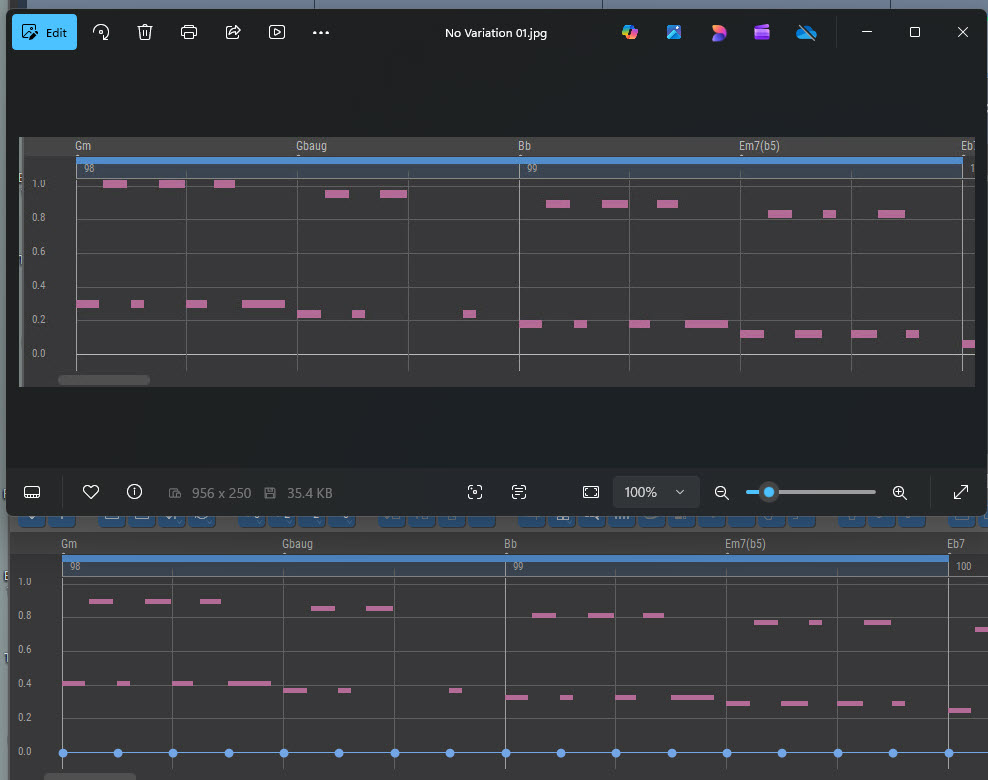
I'm pretty sure that the playback is the same though.
Ideally, I think the a "no Variation present" view, and a "Variation set to 0 across the board" view would be visually identical.
I find it useful to start from "Variation set to 0 across the board" and then generate new Variations. The undo/redo feature then makes it easy to audition and compare, all the way back to the original ( "Variation set to 0 across the board" ), Keeping the original "in-the-mix" this way is desirable.
Mi., 25.02.2026 - 19:02 Permalink
The value grid and vertical scaling is for the parameter. Output is merley background information. It scales a bit with the foreground