

Posted
Hi.
I'm noticing that whenever a new Container, or a new Snippet starts playback, volume information is sent thru to my output device and whatever volume I have already set there is overwritten.
IOW, the mix I setup in my multi-timbral device (e.g. Kontakt 8) is destroyed.
This is not what I want, since my approach is to use the plugin UI to get my levels and pans set up nicely for all of my Kontakt channels and then save that multi for restoration/reuse at any time.
How/where can I tell Synfire to not send mix data to my multi-timbral device(s)?
I thought this might be the answer:
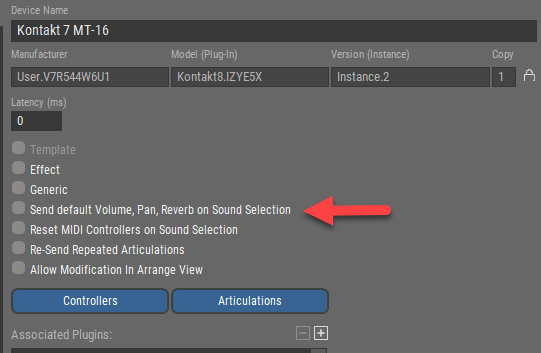
but unchecking that did not make a difference.

Sa., 10.01.2026 - 17:48 Permalink
If it changes with a container there is a volume parameter set somehere
Sa., 10.01.2026 - 21:18 Permalink
If it changes with a container there is a volume parameter set somehere
Yup, all the way back in my Library.
Used Library Cleanup to remove the Volume parameters there.
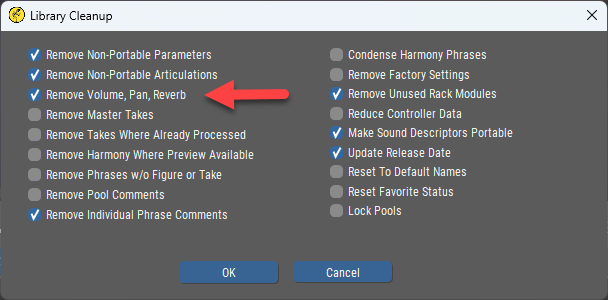
That solves the future. Thanks very much!
Removing the Volume parameters for the containers and snippets in existing projects will be more painful, as it seems I'll have to do those one-at-a-time.
So., 11.01.2026 - 13:37 Permalink
That solves the future.
I wrote too soon.
It turns out that the library has some very important dynamic panning information in it, so it is untenable to strip out all of Volume, Pan, Reverb together.
Wrt. that particular operation, having separate options for each in Library Cleanup would be desirable.
Actually though, the entire situation is more complex than it first appeared to me.
It turns out even the Volume information in the Library is appropriate and important in certain contexts. Destructively losing it on a permanent basis at the Library level turns out not to be the way to go.
However, once phrases have been dragged out of the Library and into the Snippets grid, there are two kinds of control that would be very helpful to have.
1. Being able to flip a switch and have the Volume parameter be ignored in all Snippets at playback time (in favor of the configured multi). Without this there is no other way to ensure that the configured multi governs the mix except to destroy all Volume parameter information. That level of mass destruction is generally not desirable.
2. Being able to actually delete the Volume parameter from all snippets in a single operation (instead of having to visit them manually one-by-one). Yup, this is that very mass destruction - but if one is going to do it, a simple single operation to accomplish it is much-to-be-desired.
So., 11.01.2026 - 13:49 Permalink
I've been discussing above how to setup to have configured multis (e.g. in Sampletank, Triton Extreme, Kontakt, etc.) govern the mix.
Let me talk about and ask about the opposite approach - how to definitively and easily have Synfire Volume parameters (or other settings?) govern the mix.
I realize the current system gives total fine-grained control by allowing the user to put Volume parameter info for every instrument in any/every container and snippet (snippets are containers) . No doubt it was designed for exactly this. Such fine-grained control I'm sure is necessary in many situations where dynamic changes are needed or desired.
OTOH, what if one just wants one overall mix, applicable to a specific project/arrangement, configured in Synfire, and always applied just once at the start of playback. This one mix, once setup, should cover both Structure and ad-hoc Snippet playback, and require no further intervention (e.g. like having to fire a specific snippet) once established.
Is that easily doable now? If so, what would be the recommended way to do it?
If not, could some future alteration of Synfire support that?
So., 11.01.2026 - 14:38 Permalink
I note that if we had multi-selection of snippets (e.g. with a lasso), then we could do this to mass-delete all the Volume parameters:
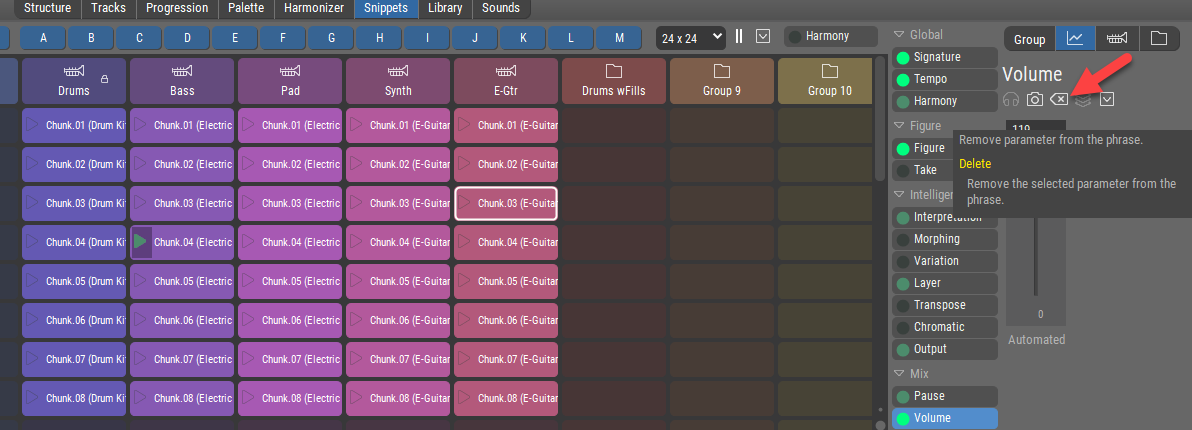
Of course, there are many things that would be easier with multi-selection of snippets, so when Snippets are revisited perhaps multi-selection could be taken on.