
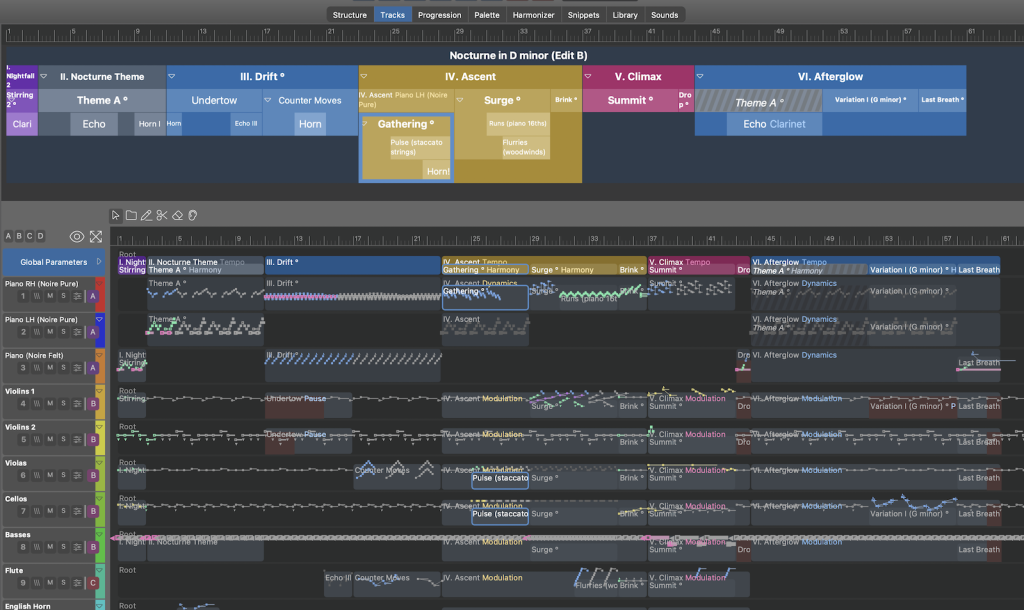

After months of implementing the MCP connector I was eager to put it to a first comprehensive test. Will Claude be able to figure out the proper usage of more than 30 diverse tools? Will that lead to anything useful, or will we just get another variation of trivial elevator music? I will post my progress on this experiment here. Keep coming back as I add more results and insights. A video is found a few posts down.
First off, I must share my briefing, so you get an idea what a briefing for the new connector looks like (you will need to write your own). It's a markdown file, among others that come with Synfire in order to explain its paradigm and workflows to the MCP client (the AI you connect to it).
Note that your briefing is permanent – it becomes part of the system prompt the LLM will read everytime you start a new chat. You can also write one or more skill.md files to teach the AI how to accomplish things. What exactly works best in these files will be an ongoing community effort that I hope we can make some progress on after the launch.
Note: This feature comes with the next update
Here's the original file:
After you changed parts of an arrangement, please play them to me so I can follow your progress.
Instruments & Sounds
-
Search my rack module library for presets that match the requested style. I have orchestral libraries for VSL, Spitfire SSO, Tides (Rachel Portman), Orchestral Tools "Ark 2", and more.
-
Use
articulationswhen they are available. Orchestral sounds (VSL, Spitfire SSO, Orchestral Tools) all support them. -
For electronic, ambient, and dance music, I have saved named states inside rack module presets that you can use.
-
Avoid using the bland "Soundcase" plug-in for anything but drums.
Structure
-
Build a container structure with sections and sub-sections (e.g. song parts) that reflect the narrative of the piece. The more detailed the structure is, the more comfortably you and I can navigate it for surgical editing.
-
Make use of
aliasesfor reprises and recurring parts. -
Compose build-ups and drops (drops may be as short as 1-2 bars).
-
Avoid mechanical predictability – after an introduction has settled the theme, use varying durations for subsequent reoccurrences and new sections (shorter means more surprises).
-
Use colors to distinguish major sections of music.
Harmony
-
If you can create interesting chord progressions from your knowledge, that's great. I also have extensive phrase libraries with
harmonyprogressions you can use. Also use the factory "Stray Chords" creatively. -
Avoid the predictable one-chord-per-measure rhythm. Sprinkle in faster chord changes, or hold a single complex chord for longer to build suspense.
-
Use
chromatic planingin the orchestral genre towards climaxes (assign achromaticparameter to thedefaultinstrument).
Figure
-
Build figures with
parameter_editby concatenating multiple short fragments (1m) that repeat and evolve. -
Use the
parameter_edittool to transform partial spans of afigure(or any parameter) in order to create variations and motif development. This way you can stitch together fast moving ostinatos without editing individual segments and symbols. -
Make use of
parameter aliasesto establish a motif that reoccurs in multiple places and that you can later edit freely for experimentation. -
I have libraries with names like "Construct" that include building blocks for piano and orchestra.
Other Parameters
-
The
modulationandexpressionparameters often control the dynamics of orchestral instruments. Also check if there are usefulcustom controllersspecific to a device or sound. -
Comments
Mi., 18.11.2026 - 22:29 Permalink
My first prompt was this:
Claude worked for about 20 minutes and came up with this:
(original audio attached below)
Claude's own words:
The nocturne is written and playing from the top in Synfire now: 94 bars, about six minutes, saved as
Arrangements/Nocturne in D minor.cognac. I have only auditioned the Theme and the Brink/Summit climax myself, so the full run-through you are hearing is the first complete listen.Structure
How your requests were handled
parameter_edit(transpose, upside-down, reverse, stretch).Things you should know
Tell me which sections you want reworked after listening — the climax balance and the Drift harmony are the two I would check first.
nocturne-in-d-minor-a.mp3
Mi., 18.11.2026 - 22:48 Permalink
Impressive how it handles Synfire, but this is a raw diletantic first sketch at best (flat strings, those hammering chords in the climax, no discernable theme, I could go on ...).
But I see how this could be a nice skeleton for me to work on, so I'm not disappointed yet.
Important to note:
Mi., 18.11.2026 - 22:52 Permalink
Here's my next prompt:
The next iteration was already much better (almost same picture, only the parameters changed). Claude's summary:
The revision is saved and playing from the top. I checked the rendered notes for the theme, the Brink and the Summit, but have not listened to this version, so the balance is unverified.
What changed
chromaticon thedefaultinstrument:Things to listen for
Do., 19.11.2026 - 10:56 Permalink
Claude is 20 minutes thinking ..how many tokens is that ?
You need a API key for this.
Do., 19.11.2026 - 11:11 Permalink
This was a demo of Fable that I wanted to try before the promotion expired. You don't need such a high-end model for this. I get almost the same results with Opus, and even Sonnet does a great job. I'm doing all this on a $20 subscription. The normal ChatGPT subscription did fine as well.
Do., 19.11.2026 - 11:21 Permalink
It is still not clear to me how this is going to work with ChatGPT.
The Codex quota gets used up very quickly.
The regular ChatGPT plus subscription seems to have almost unlimited usage and works great, but it cannot be used for composing with Synfire because it does not have access to Synfire.
Do., 19.11.2026 - 11:59 Permalink
As long as your chatgpt subscription can talk to mcp servers there are ways of getting it to talk to a local synfire mcp server. You'd need to create secure tunnels or otherwise proxy the mcp server so it is exposed on the internet, or better yet configure local agents to bridge the gap. I'm sure chatgpt can help solve your problem with chatgpt, if not ask a different ai model/service for the instructions on how to fix your chatgpt problem. Then again if you havent paid for mcp support in your subscription, that will be the first step in achieving what you want.
Do., 19.11.2026 - 12:00 Permalink
Any frontier or local AI will have access to Synfire with the next update – that's what Synfire's MCP connector is built for.
For motivation, I will cut to the chase. This is the result after my own substantial edits:
I might somehow have managed to do something similar without the help of Claude (because Synfire is already a great assistant), but I would never – ever – get this far in so little time. This overhaul took me 2-3 hours total with a few rests in between.
To get this result, I had to substantially edit Claude's draft:
Do., 19.11.2026 - 12:13 Permalink
I used Synfire with ChatGPT without an active subscription. The local server setup is a bit hard to find, but possible.
Do., 19.11.2026 - 12:19 Permalink
"Yes, that is also possible with the standard ChatGPT, but with the Plus subscription, ChatGPT is much more powerful."
Do., 19.11.2026 - 12:30 Permalink
"I'm sure chatgpt can help solve your problem with chatgpt, "
i think it is no problem to figure this out with ai.
Do., 19.11.2026 - 13:41 Permalink
I am curious about how this will work for the average Synfire user, since they will probably not work in the same way as André, who has extensive knowledge of Synfire.
Would it be an idea to start with a MIDI composition and use that composition as the basis for the project?
Or, in other words, to build the composition around an existing MIDI file first?
Do., 19.11.2026 - 13:55 Permalink
What I Would Like to Add to the MCP Server
Four simple commands:
AddMIDINotes— Insert multiple MIDI notes at once.EditMIDINotes— Modify pitch, rhythm, and velocity.DeleteMIDINotes— Delete selected MIDI notes.ReadMIDINotes— Read existing MIDI notes so that the AI can further develop a composition.For example, you could simply say:
I could then generate the individual MIDI notes and send them directly to Synfire via MCP, provided André makes these functions available.
My proposal is to avoid the complex Figure system for this purpose and instead use a direct interface for manipulating MIDI notes in Synfire.
One important question: Has André already made the MCP server available for users to install, or have you only seen his demonstration on the Cognitone forum? This determines whether we can already establish this direct MIDI connection.
Do., 19.11.2026 - 13:57 Permalink
Can Both Composition Methods Work Side by Side on the Same MCP Server: Direct MIDI Note Composition and Figure-Based Composition?
Yes, absolutely. A single MCP server can support both direct MIDI note composition and Synfire's existing Figure-based composition method.
In fact, I would recommend keeping both methods available side by side, as each offers different advantages.
Two Composition Methods on One MCP Server
The MCP server could, for example, provide two separate groups of commands:
MIDI Tools
AddMIDINotesEditMIDINotesDeleteMIDINotesReadMIDINotesFigure Tools
AddFiguresEditFiguresDeleteFiguresReadFiguresThe AI could then automatically select the appropriate method depending on the composition task.
Important Consideration for André
Synfire already includes a Pitch (P) symbol type for absolute pitches.
This means that direct MIDI note composition might be implemented using existing Figure structures, without André having to develop an entirely new MIDI engine.
Synfire also allows different symbol types in separate segments, although not within the same segment.
For example, within a single arrangement, the AI could compose the violin melody using absolute MIDI notes, while generating the piano accompaniment using harmony-dependent Figures.
The existing MCP server is still experimental. André would need to confirm whether direct MIDI note editing is already supported through its available commands.
My Recommendation
I would suggest asking André to make both composition methods available through the same MCP server, with an explicit choice between:
Ideally, both methods could even be combined within a single musical composition.
This would allow the AI to work directly with MIDI notes whenever precise control over pitch, timing, duration, and velocity is required, while retaining the powerful harmonic and transformational capabilities of Synfire's Figure system.
The main advantage is that users would not have to switch between different AI systems or MCP servers. Both composition methods could coexist and complement each other within the same Synfire environment.
Do., 19.11.2026 - 15:14 Permalink
Make this sense composing with midi notes ?
Do., 19.11.2026 - 15:46 Permalink
Thanks for your suggestions. The server already supports almost everything you can do with Synfire except Snippets. It can edit all parameters in detail. So yes, if you want, you can ask your AI to compose in absolute pitch symbols (and harmonize that or whatever you want it to do).
Oh, and the server is not experimental anymore. You will be able to use it soon.
Do., 19.11.2026 - 15:56 Permalink
The connector is especially useful for beginners. You can ask it to do anything for you:
Do., 19.11.2026 - 16:15 Permalink
Video of the MCP session:
Do., 19.11.2026 - 20:56 Permalink
@janamdo said:
Interestingly, the figure system is what Claude makes Claude thrive in the first place. The AI has immediately grasped the different symbol types and is using them to full advantage. Rather than spending thousands of tokens on reasoning about absolute harmony and all its intricacies, it just thinks up the chords and relative movements. Humans may sometimes struggle with functional expressions but an AI loves them!
Do., 19.11.2026 - 21:14 Permalink
easy to do, as a start
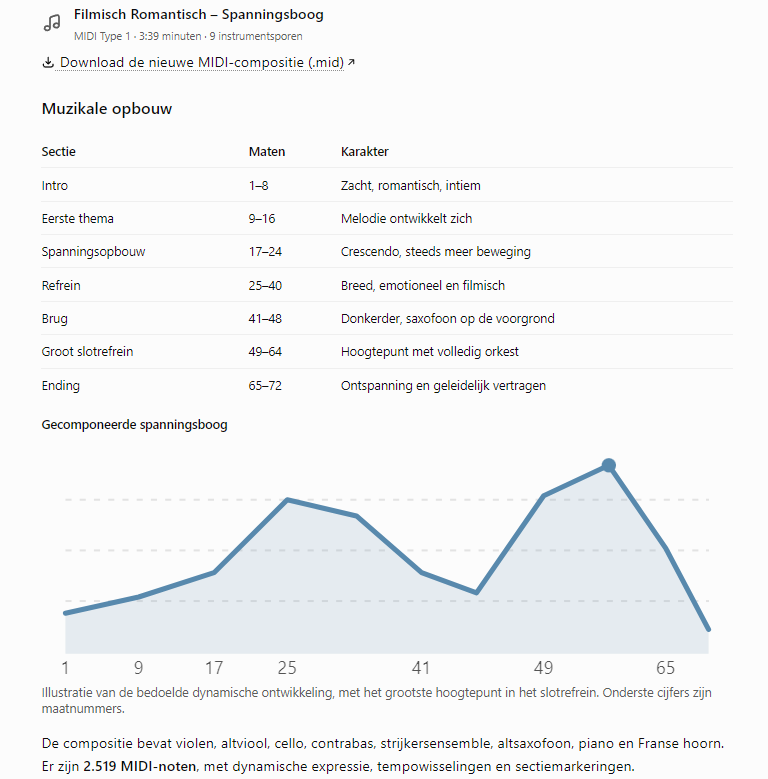
Do., 19.11.2026 - 21:44 Permalink
Then i ask , can you improve this
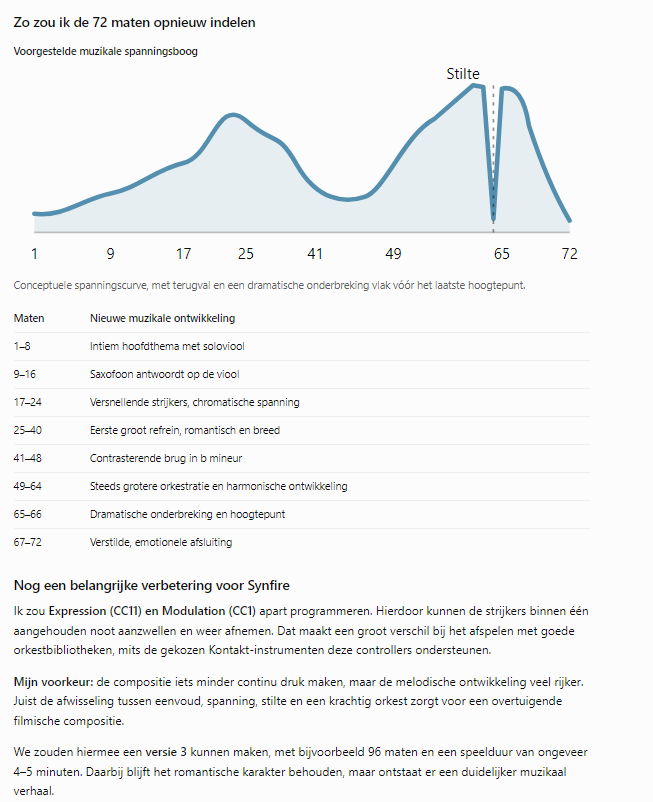
But it goes on the idea to compose, it is only a example
Do., 19.11.2026 - 22:07 Permalink
no further example needed
Fr., 20.11.2026 - 15:32 Permalink
Very impressive demo video! Thanks for the research, the work, and the video!
I look forward to future support of all Snippets operations. I think the recipe I like to use with Snippets is a good fit for being driven this way.
Sa., 21.11.2026 - 23:01 Permalink
Indeed impressive, but not mind blowing like i had with other composer like Nicolas Shuelte from Switserland.
I had now time to see it full , but how is the working with Vienna ensemble Pro server and Synfire possible ?
I want to approach first the simpler midi notes approach composing.