

Posted
Hi,
I am observing something I don't understand (might or might not be a bug) which is definitely in the way of my current attempts to work with Synfire.
Two snippets columns (instruments), which I intend to set differently to play different sounds (via external MIDI) are not allowing me to set each one individually. IOW, whenever I change one, the other changes also.
I've made a video:
I doubt it matters, but in case it does, the output is to a loopMIDI virtual MIDI port driving an instance of Sampletank 4. The output happens just fine, and is heard fine, but both columns send to the same ST4 instrument (channel) when the intent is to send to different instruments (channels).
So, is there anything I could have set incorrectly to make this happen? Is it a bug?
I'm stuck!

Tue, 2025-12-16 - 21:13 Permalink
Multiple instruments can use the same sound = device + channel. If you change the sound on some device and channel it changes for all instruments that use it. You want to use different channels for instruments.
Tue, 2025-12-16 - 22:28 Permalink
Thanks for your reply.
You want to use different channels for instruments.
I thought I was (I think I am).
Here is a picture of the device description.
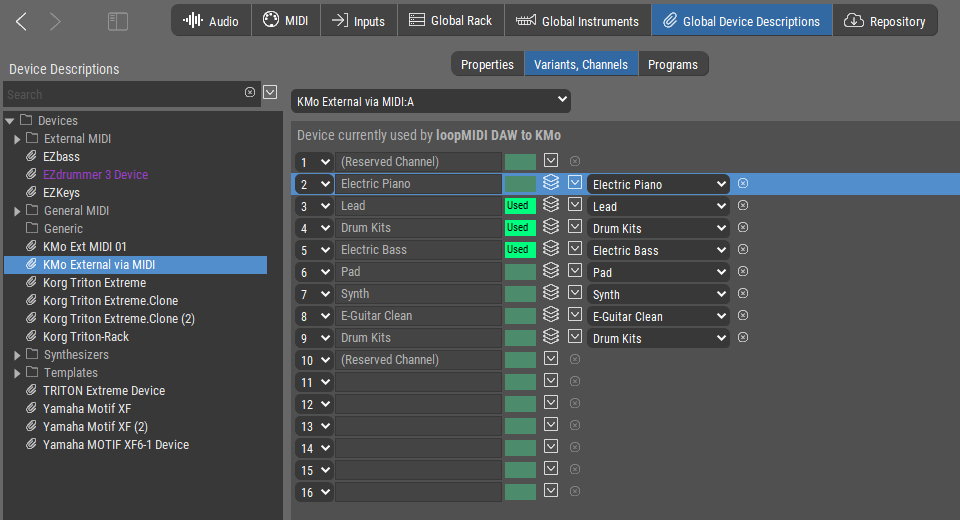
I see 1 thru 16, each discrete.
I still do not understand why those two shown in the video are changing together.
Is there someplace different I need to look/set?
Wed, 2025-12-17 - 10:15 Permalink
Both snippet columns use the same instrument. If you want to assign a different sound to one column you must create a new instrument and move the snippets to that new column
Wed, 2025-12-17 - 12:08 Permalink
Both snippet columns use the same instrument. If you want to assign a different sound to one column you must create a new instrument and move the snippets to that new column.
OK, and thanks. I'm sure you're telling me what I need to know, but I don't understand it.
Both snippet columns use the same instrument.
Do you say that because in the video both columns are titled "Pad"?
I have changed one column to read "Lead", and that does not stop them from always changing together.
The video shows me setting each column output (under the instrument symbol) to a different destination in the Global Rack. Is this not the column's "Instrument"? If not, what is it?
Where can I see all the "Instruments" and to which Instrument all of the columns are assigned?
If I need to create a new Instrument, where do I do that?
If the Device Descriptions (and their channels) are not Instruments, then what is the explanation of the relationship between Instruments and Device Description (and their channels)?
If possible, if you could answer each question directly, I think that would help me.
My background is with mutli-timbral hardware synths, and my concept of "instrument" comes from there - a sound assigned to a channel. It is hard for me to invent any other way to think about it. It seems I need some introduction to a new paradigm here!
Thanks again.
Wed, 2025-12-17 - 12:26 Permalink
The above might lead one to wonder:
a) is this guy a cup short on brain cells?
b) how has he been around and working with Synfire all this time if he doesn't understand that much?
To a), I can only say "I hope not!"
to b), the answer is this:
I spent many days, if not weeks creating a minimal working setup long ago, The process was so convoluted and confusing that even with notes taken along the way, I never really clearly understood how I ever got it working. But I did, and once it was working, I moved on.
Now I'm back facing again the situation I never really understood.
It's hard to argue for a re-design of something I don't currently understand - maybe it is actually brilliant and I just don't know it.
What I do know is that full tutorial information here (text, diagrams, and video), both conceptual and practical, which starts by assuming the user knows nothing about the subject is much-to-be-desired. Thanks.

Wed, 2025-12-17 - 13:40 Permalink
Appreciate your humor ;-)
Your confusion here is clearly with the snippets grid and what the column labels mean.
The columns are NOT instruments. You can drop anything on the grid. A column is always labeled depending on what content currently is found in the column (automatically). When you select a snippet or column heading, Synfire selects an associated instrument merely for convenience (so you don't have to look for it). The first instrument that happens to have at least one parameters in a snippet in the column is selected.
In your video it selected the same 'Pad' instrument when you clicked on either column. Because the snippets in those columns happen to contain parameters for that instrument.
All available instruments can be found on the Structure or Tracks page. That's where you add/remove instruments.
Wed, 2025-12-17 - 16:32 Permalink
Thank you for your comments, they helped, as did the reference to the video.
The columns are NOT instruments.
A critical point, and one I was not clear on!
Both Concepts(1) and Concepts(2) videos offer good diagrams and explanation of the core ideas. I needed the refresher!
https://users.cognitone.com/tutorial/concept-1-terms
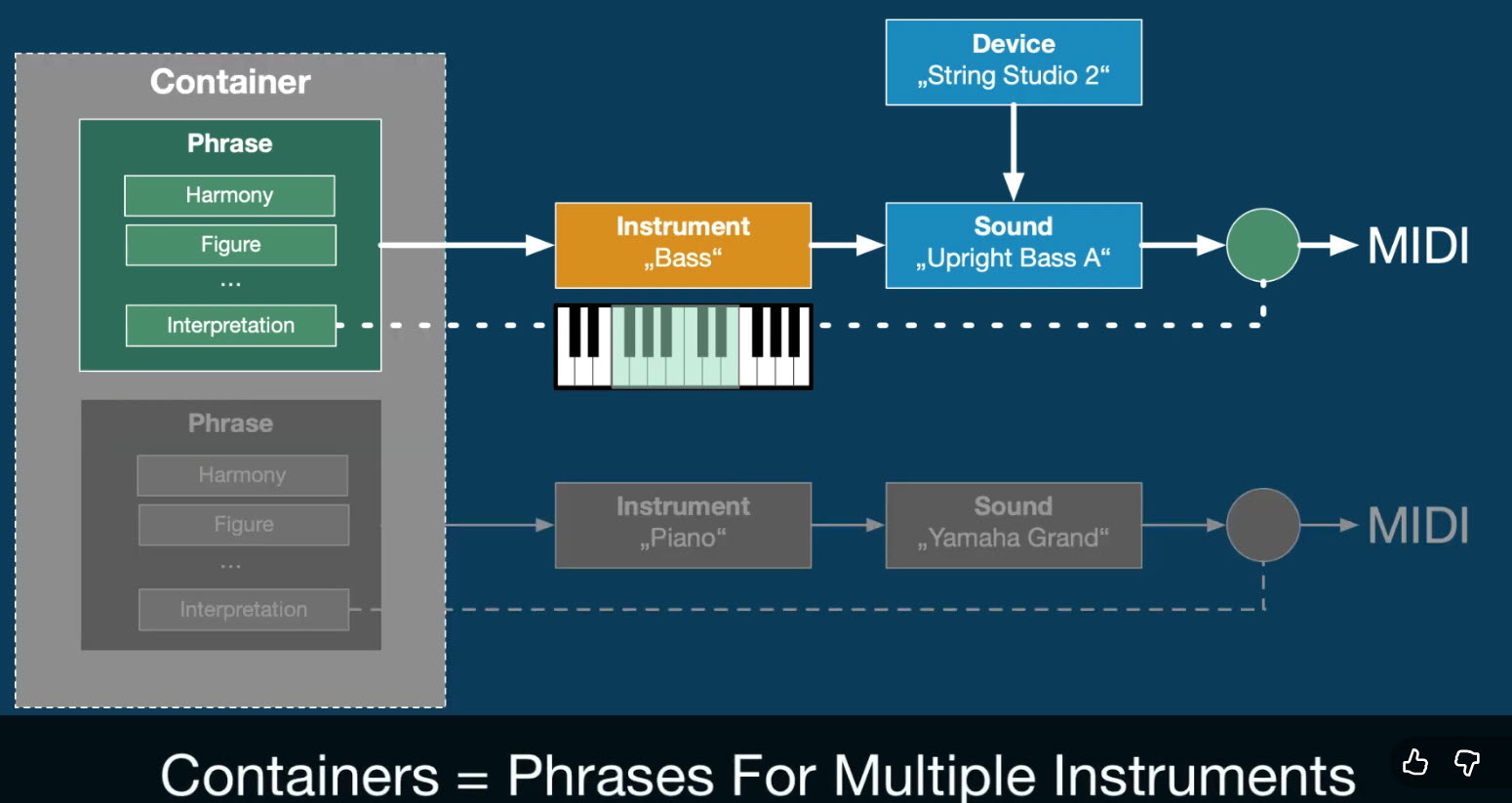
(https://users.cognitone.com/tutorial/concept-2-racks)
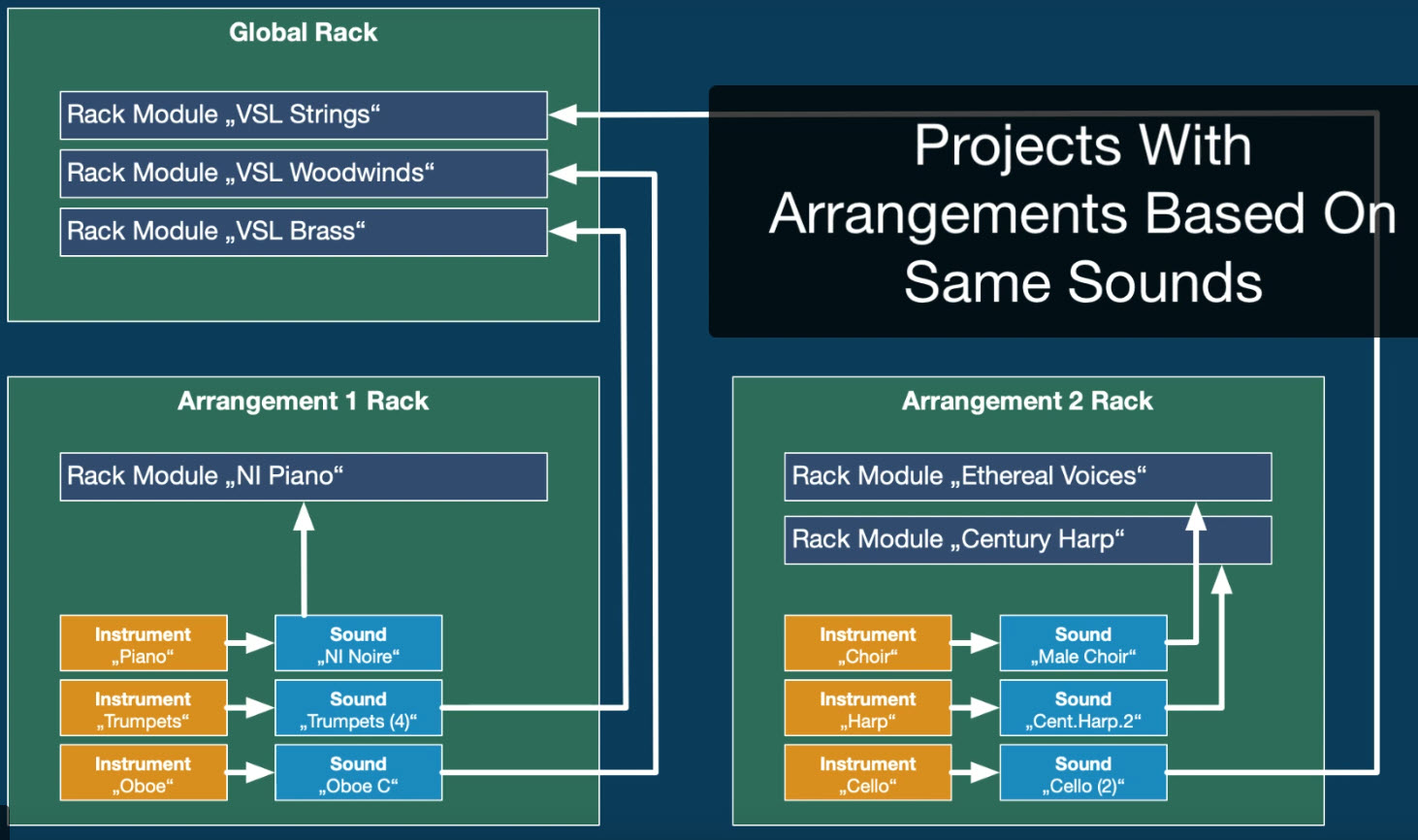
I will probably have some further questions about the dialogs and behaviors when library items are dragged into the Snippets Matrix after I do more experimentation. Most likely I'll start another topic with an appropriate title.
Thanks again!

Wed, 2025-12-17 - 17:00 Permalink
Possibly you were falling into the same trap I did when I first saw the snippet grid. It isn't the same as the session view in ableton or bitwig. Unlike those two DAWs, in synfire, each snippet cell can contain a phrase that plays using multiple instruments, rather than the instrument be defined by the column.