
Synfire's paradigm change allows for unique new workflows. An overview.
1. Speculative Writing
This approach is similar to writing music with a DAW or notation program. Your are sketching melodic lines, patterns, and rhythms into an interface that vaguely resembles a piano roll (the phrase editor). Only this time the patterns are tiny algorithms that generate music in relation to context.
This writing technique is full of surprises. While you are following your concepts and instincts, you don't know the exact outcome in advance.
And that's the point.
- Sketch simple patterns into the Figure parameter. Use the same rhythms and melodic shapes you already know are working for your style. Just ditch the pitch.
- Write more patterns for additional instruments. For variations and surprises, use different symbol types. Apply your existing knowledge about orchestration and genre.
- Draw expression and dynamics automation in the Modulation parameter, or simply record the parameter using an external MIDI controller.
- Insert a progression into the Harmony parameter and see what happens. Try different progressions from a library.
- At some point a result will "click" and you continue to develop your piece along that path.
This approach is a natural fit if you are used to writing music note by note (in fact dynamic writing is a lot easier). It works great for piano and orchestral music, and any genre that thrives on melodies.
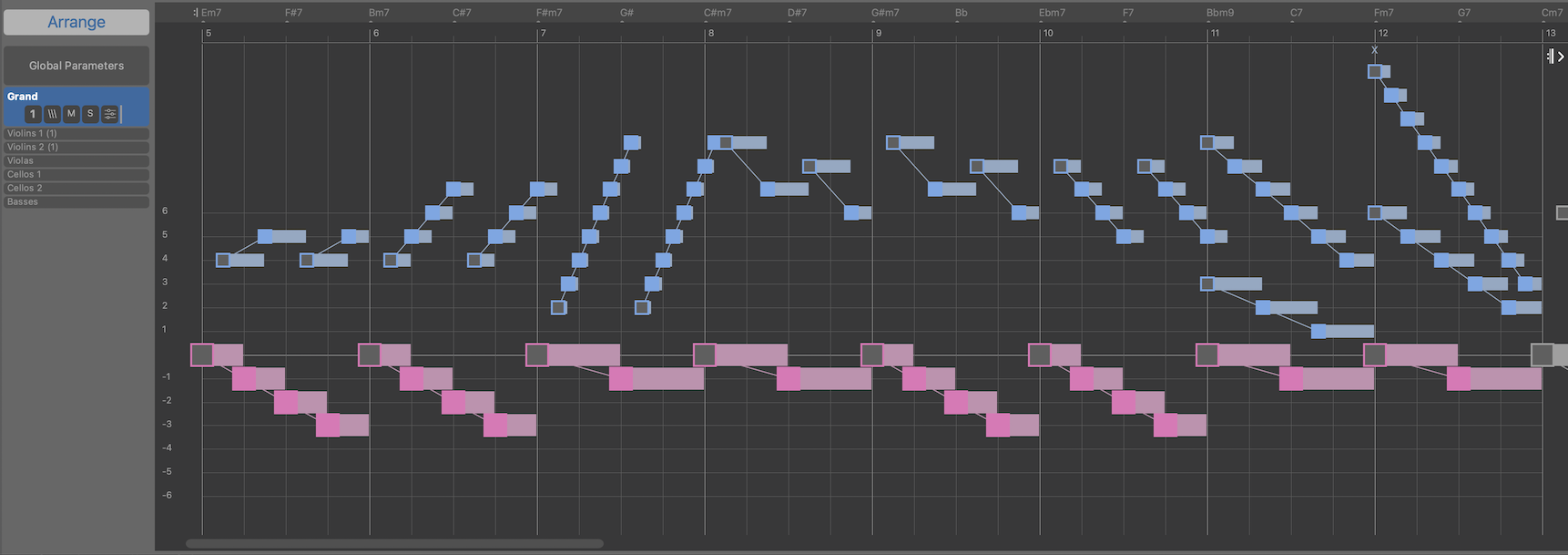
The following example emerged from an eight bar Figure rendered against Harmony that runs through twelve keys in a circle. A Shift parameter adds rubato and human touch. Strings were copied from another arrangement and edited to fit. A chained V-I cadence is transposed 4 semitones at each turn until the circle closes: Cm7 D7 | Gm9 A7 | Dm7 E7 | Am7 B7
This is the main figure (with a bit of sectioning and cut/paste):
2. Melody First (Arrange Around Static Pitches)
In this classic approach, one or more melodies are already given (static pitches) and more voices are added to establish harmony and timbre. In a DAW or notation program, this means you must write static voices that perfectly complement the harmony you have in mind. Each time you change your mind about the harmony's progression, you must manually rewrite all voices from scratch.
In Synfire, you send static melodies to the Harmonizer and pick from the Harmony progressions it suggests. All additional voices are re-composed automatically to follow your choice.
- Record a melody, set Figure Recognition to static pitches, and select the Take or Figure as input for the Harmonizer.
- Import one or more tracks of a MIDI file (e.g. your previous work) and arrange new music for additional instruments around them.
- Simply draw a melody with static pitch symbols.
3. Harmony First
In this approach you start with Harmony before you add melodies and textures that evolve and unfold along that progression.
The advantage is that the progression already makes sense as a narrative arc. You no longer need to solve the daunting puzzle where all your individual melodies should ultimately meet and land. With this approach the paths and conclusions are already baked in. Harmony guides all instruments to your planned destination.
And if you change the destination, they will happily follow along.
- Use Palettes to try out interesting chord changes. Use Factories to generate a progression. Grab a Harmony parameter from a library.
- Start an arrangement with this Harmony and add a very simple pattern that generates subtle hints of slow moving melodies (using a slow pad or strings). Listen carefully and focus on melodies that pop up in your imagination.
- Write a Figure for the melodies you hear in your head. Use blue horizontal symbols and transpose each segment with the arrow keys to match the pitch.
- Use the Speculative Writing approach to write additional melodies for other instruments. Distribute them vertically to establish the characteristic intervals of your Harmony (Interval and Relative symbols are great for that).
- Use the Rummaging Through The Attic approach to add more elements that fit the style.
An example of this workflow is demonstrated here.
4. Snippets
This approach uses the Snippets grid, which is roughly equivalent to live loops or clip launchers in a DAW. Only that the clips in Synfire are dynamic parameters - any parameters - that compose music on the fly. Shuffling random combinations of Snippets almost always leads to refreshing surprises you want to keep. You can arrange them immediately, or collect them in libraries for later use.
Did you know you can extract Snippets from any arrangement? Have you ever played a big grid that was built from three or more different arrangements? It's super inspiring.
- Start a new arrangement and leave it empty for now.
- Open another arrangement and extract a snippet grid there. Drag the grid's columns to the grid of the new arrangement.
- Alternatively, open any Library and drag phrase pools to the new grid's columns.
- Don't forget to add some Harmony you can choose from.
- Repeat steps 2, 3 or 4 until the new grid is populated with enough material.
- Shuffle random combinations with the dice button. Right-click on a memory button to remember interesting patterns.
- Stop playback and play the Memory Buttons live in any order (improvise).
- Stop playback and convert the snippets session to an arrangement (retroactive recording).
- You can also drag the memory buttons to a library for later use.
This approach is great for every genre, not only for popular music. It also works for ambient and atmospheric music. At its core it's about finding the best combinations of multiple clips and harmony.
5. Rummaging Through The Attic
In this approach you make use of hundreds, if not thousands, of elements you have collected in libraries over the years. Progressions, rhythms, textures, melodies, fragments of any kind. You may have imported, dissected, and harvested MIDI files from previous projects or classical scores.
Imagine yourself in a room full of boxes with LEGO parts you've always found beautiful and interesting but didn't yet have a use for. Now that a concrete idea is beginning to shape in your imagination, they automatically transform into the colors and sizes you need!
- Import MIDI files and harvest them for useful fragments.
- Generate phrases with Factories.
- Keep everything that might some day be useful in a Library.
- Browse your libraries when you need something for a new arrangement.
The challenge with this approach is to find the one inspiring element to start with. It may be simple or complex (you can take it apart), but it needs to set the tone and direction you want to take. On the other hand, this is a great approach when you are currently out of ideas and need a spark of inspiration.
Summary
None of these approaches is used in isolation. Depending on your mood or what triggered your ambition to create something today, you start with one of them, and then it quickly branches into other approaches. All of them can be used as an extension of each other.
Since all Synfire elements are reusable, Rummaging Through The Attic occupies a special place among them. Having a collection of reusable elements at hand is always beneficial, whatever you do with Synfire.
Teaser photo by Andreas Forsberg on Unsplash
Comments
Sun, 2026-07-26 - 13:58 Permalink
This is an excellent overview of 5 powerful ways of working with Synfire. Congratulations!