

Posted
Leave it to me to push the limits ... <g>
(With my newly cleaned Harmony-only library) I dropped a song-length Harmony into a snippet, and with that snippet selected, attempted to MIDI export another snippet (with Figures).
An error was thrown (I submitted the crash). The result was an output directory created (with a truncated name), but no .mid file in it.
I've highlighted how far Synfire got in building the name:
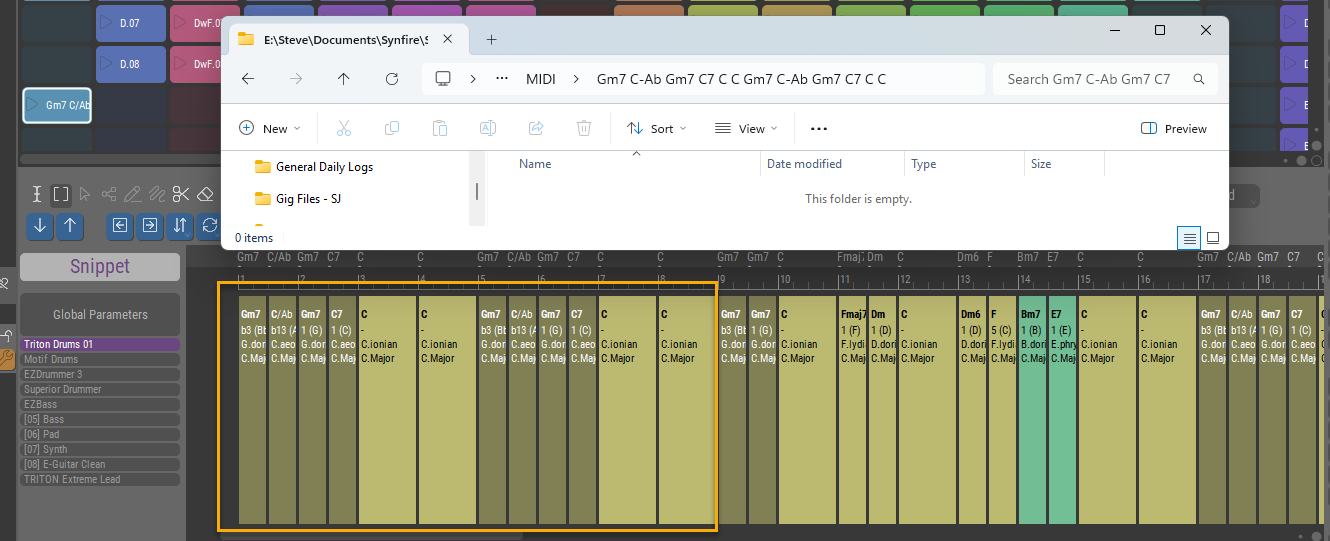
Yes, this might be considered an extreme situation, but it is an actual use-case.
Using Synfire to generate full-song-length MIDI from a single complex (full-band) snippet would be an excellent way to output all the sections of a song as source material for slice-able sections of absolute MIDI to be used as clips in Ableton, Bitwig, etc.
Obviously we are going to run into directory name and/or file name length issues if no sanity checks are done. By sanity, I don't mean sanity of the user <g>, but merely sanity of the text strings we will be using for naming output.
Possible suggestions:
- Synfire adopts a legal-for-dir-and-file-names closing text symbol and automatically uses it to terminate dir-and-file-names which are detected as getting too long.
- Synfire pops up a "Name is Too Long" dialog and prompts the user to enter a shorter name that would be legal.
Either of the above could be useful. An option to choose between them could be considered.
Actually, this is more of a directory name length problem than a file name length problem, so in cases like this being able to type in the name of the Song and have that be the output directory name would be a good, desirable outcome.

Fri, 2025-12-12 - 22:01 Permalink
You can export audio per container on the structure page. Select container, capture output, done.