

Posted
After starting Synfire Pro up there are 58 instances of the Plugin Scanner process running in the background. This takes up a lot of memory (largest 1082MB smallest 33 MB). Even if I close Synfire these processes are not terminated.
I am running Windows 11 (windows update tells me: You're up to date)
I am using Synfire Pro 2.6.2.

Wed, 2025-07-02 - 14:18 Permalink
There should be no more than 8 processes at the same time. When a plugin hangs it can take some time until the process is killed. How many plugins do you see that could not be scanned? I mean which are missing from the menu after the scan completed.
Wed, 2025-07-02 - 23:33 Permalink
Well quite a lot. I'll attach my broken plugins (according to synfire). As a work around I've added all these "broken" plugins to the BrokenPlugins64.txt file so Synfire skips them.
Fri, 2025-07-04 - 07:25 Permalink
Thats an unusually long list. What do the plugins have in common? Have you tried a full rescan from scratch?

Fri, 2025-12-12 - 19:56 Permalink
My Synfire keeps trying to scan the same failed plugins every time I start up.
Using BrokenPlugins64.txt does not seem to help.
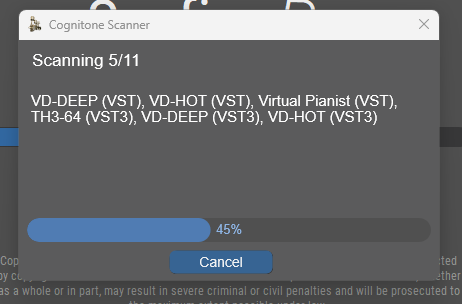
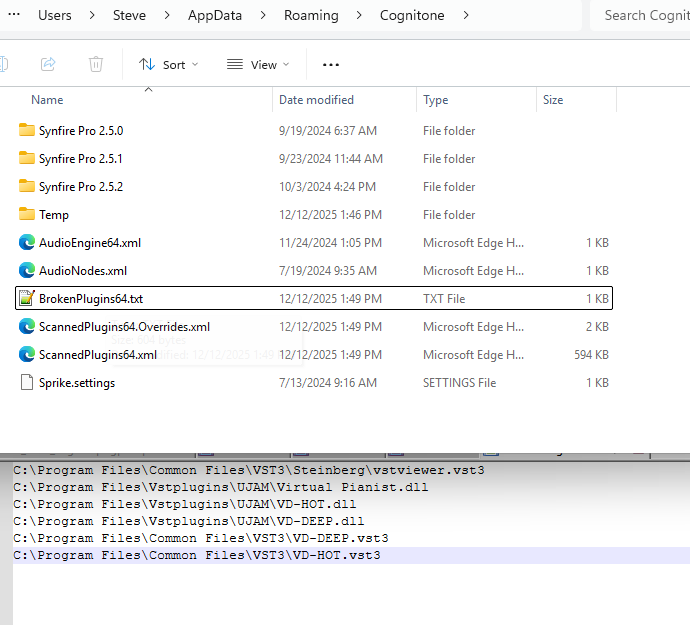
It's not that big a deal to maintain the list manually, but if it doesn't work, well ...
Ideally I think Synfire could/would write such a list automatically and never revisit any plugins that are in it.
The user could then edit out any given line from the list (to try again), or else call for a full scan at will.