

Posted
Can Synfire add a rack/module destination that outputs rendered MIDI to a selectable system MIDI port, so tools like Divisimate, loopMIDI or LoopBe30 can receive Synfire’s MIDI in real time?
I like to play Divimate in Synfire...

Mon, 2026-06-29 - 18:33 Permalink
Yes sure. Drop a MIDI port from the rack module library sidebar on your rack and set it up as the desired instrument. All output will go to that MIDI port.
Tue, 2026-06-30 - 08:27 Permalink
Instead of loading a plugin you use the MIDI module. Everything else remains same

Tue, 2026-06-30 - 19:40 Permalink
Currently MIDI output of one VST (Divisimate) can't yet be routed to other rack module's VST internally. The Audio Engine does not support multiple MIDI port I/O per plug-in. In theory that would be possible albeit with many new UI dialogs. If there are more use cases beyond Divisimate, let us know.
You could use a midi module to send Synfire output to your DAW where Divisimate is linked to dozens of virtual instruments. Record MIDI there and export/import as multi track MIDI file into Synfire. Then you have static notes you can compose around with Synfire (analyse harmony, add dynamic Figures, etc).

Wed, 2026-07-01 - 16:43 Permalink
I'm also experimenting with the Kontakt THE SCORE VST.
The ensemble consists of 10 instruments in The Score.
One existing feature is that, from within The Score, the 10 instrument tracks can be dragged into a DAW.
In the DAW, 10 MIDI tracks have now been created and simply need to be assigned to MIDI channels 1 through 10.
These 10 MIDI channels in the DAW now play back the ensemble with 10 instruments.
In The Score, these 10 instruments are controlled via a chord track in the DAW and recorded automatically; after that, you can drag the 10 instruments into the DAW.
This functionality isn’t yet available in Synfire; if you drag all 10 MIDI tracks into Synfire, only one track is imported, and starting with a static setup is the quickest way to begin.
Another challenge in Synfire is connecting the 10 dragged MIDI tracks to the 10 instruments in The Score.
This The Score VST opens up many compositional possibilities in Synfire, provided you can get it to work.
It seems to me that this would be an easier setup for The Score VST than the Divisimate 2 VST setup in Synfire, right?
Thu, 2026-07-02 - 09:56 Permalink
if you drag all 10 MIDI tracks into Synfire, only one track is imported
File/Import /SMF imports all tracks into a new arrangement. If you want to use the tracks in an existing arrangement you copy the tracks where you want them. Synfire can have many arrangements open at the same time.
Thu, 2026-07-02 - 11:10 Permalink
Importing that MIDI file isn't a problem, because from The Score you can drag a MIDI file onto the Windows desktop and then import it statically into Synfire—that works fine.
The next problem is that once the 10 midi tracks have been imported, they need to be connected to the 10 instruments of The Score VST in Synfire.
You need to get this working to take full advantage of The Score VST’s composition capabilities.
The current phrase library and phrase generation are labor-intensive, and there’s been little progress—it focuses too much on the details, and this has certainly been the case for at least 10 years
Even then, one can’t help but wonder how much work Cognitone has put into this.
With The Score VST , you can work with complete arrangements that you can fully customize to your liking, and it also serves as a phrase generator
Thu, 2026-07-02 - 11:24 Permalink
The next problem is that once the 10 midi tracks have been imported, they need to be connected to the 10 instruments of The Score VST in Synfire.
Drop the Score VST and create a device for it with 10 fixed sounds and set the properties for each sound. This is the default mode when you open the wizard anyway
Thu, 2026-07-02 - 11:53 Permalink
On a side note. The Score, Action Strings, etc are content products. The tech is relatively simple but they offer a lot of pre-made styles to play with. With Suno you get even more convenience - you just write a prompt. There's much hype about that because its "wow" and feels great at first. But aside from the entertainment and instant gratification, the results don't stand out. Who's going to an art gallery where the exhibits are the result of Painting-by-numbers? Random variations of Van Gogh won't magically create a new artist that isn't perceived as Van Gogh.
Synfire is about creating and using your own "odd and unusual" phrases, melodies, moods, "music logic" so to speak, so you don't sound like a mere variation of someone else. I believe, now more than ever, being unique is the only way to create value in the face of massively generated AI slop that currently drowns everything (around seven million songs every day?).
I admit that we need to do a better job educating users how to get there.
Thu, 2026-07-02 - 12:06 Permalink
The fact that Synfire is unique has been touted for a long time now, and that’s certainly true, but what’s unique to you doesn’t necessarily apply to me musically.
The Score VST serves as an idea generator, and with the expansion packs that are already available for it, you can easily create your own unique arrangements.
Thu, 2026-07-02 - 14:15 Permalink
To make The Score easy to use and to continuously connect new ensembles of 10 MIDI instruments, it should work just as it does in a DAW.
A chord track is created, which generates an ensemble arrangement in The Score VST; this can then be imported into Synfire as 10 MIDI tracks.
Synfire assigns its own instruments to these tracks during import.
In a DAW, the 10 MIDI channels are created without instruments, but by assigning a MIDI channel number, an instrument is assigned in The Score VST.
This is the fastest and simplest way to do it.
This workflow should also be implemented in Synfire—is that possible?
To ensure flexibility, Synfire needs to offer the same workflow as in a DAW.
Thu, 2026-07-02 - 16:56 Permalink
Tell me how to do this in Synfire and whether you can make it possible if it isn’t already (which, as far as I can tell, isn’t possible in Synfire)?
If not, you’ll be stuck in that phrase library without any feedback from another composition tool from which you can draw inspiration, as is the case with The Score.
One of The Score’s strengths is that you can very quickly generate MIDI for an ensemble of 10 instruments based on a chord progression.
In addition, The Score offers extensive editing capabilities.
I would consider it a missed opportunity if The Score VST couldn’t work in Synfire the way it works in a DAW.
Thu, 2026-07-02 - 17:25 Permalink
At the moment I don't yet know enough about the plug-in and how it works. VST3 no longer supports MIDI output (VST2 did). There must be some routing tricks involved, or ARA, or whatever.
We have plans to extend the routing capabilities of the Audio Engine anyway. So yes, whether it's The Score or any other plug-in, recording and/or rerouting their MIDI output is definitely interesting.
Thu, 2026-07-02 - 18:09 Permalink
Ok here's an update: "The Score" is not an actual plug-in but a NI Kontakt sound library with added scripting. There is no direct output of the generated patterns to the host (DAW, Audio Engine). The only reliable export path is drag & drop of the 10 MIDI tracks.
You can already do that. It's a bit of clicking through the import dialog but import of static pitches is fast and doesn't depend on harmony analysis (no need to harmonize all tracks together -- you can do that later in Synfire).
Thu, 2026-07-02 - 18:31 Permalink
Thanks, I’ve tried to explain how the Score VST works before generating MIDI from The Score and importing it into Synfire isn’t a problem.
It seems like we’re talking past each other right now.
The problem, however, is that these 10 MIDI tracks imported into Synfire were created via racks with the wrong instruments.
The Score VST instruments 1 through 10 in the Kontakt player now need to be controlled by MIDI tracks that already have racks connected to them, each containing an instrument.
In a DAW, you just need to set the MIDI channel numbers to 1 through 10, and the MIDI will control the instruments from The Score VST
Take a look at the videos that SonusScore has made available for The Score VST to get a clearer picture of how everything works.
Thu, 2026-07-02 - 19:22 Permalink
If the score listens to 10 midi channels you create a device and rack module for it once and use its fixed instruments for the imported tracks. Import doesnt create a new instrument if you assign an existing one
Fri, 2026-07-03 - 00:02 Permalink
providing you aren't expecting synfire to change which instrument presets are loaded in the score vst on each channel, the device description is pretty straight forward. Just tell synfire what type of instrument each channel has, eg strings->violin, bass->cello, etc. You can alter playing ranges if you don't like the ones used by synfire and whether an instrument is monophonic. No need to go through the complicated setup of a device description to tell it how to change the instruments or all the different instruments it supports.
This is how I use a hardware synth via real midi cables. Although the synth is multi-timbral, it doesnt allow me to change the synth's loaded instrument presets from synfire (or my daw). I could of course program sysex midi messages in the daw to program each sound from scratch, but I'd have to change the raw sysex manually to change how the channel sounds. Instead i just load the sound preset on the hardware's inbuilt display and buttons, then tell synfire the type of instrument is on that channel. You should find the same workflow works with synfire and the score vst.
Fri, 2026-07-03 - 09:25 Permalink
Try using a device description with 10 fixed channels in the Kontakt sampler that hosts The Score.
Through Synfie’s import window, the correct routing should then be automatically set to MIDI channels 1 through 10, as if importing the 10 MIDI tracks with data via the MIDI file.
At least, that’s the expectation.
In a DAW, you’ll still need to manually set up the MIDI channel routing once the 10 dragged MIDI tracks are in the DAW, but with a device description in Synfire, all MIDI channels are already configured.
This seems like a more user-friendly way to set up the MIDI channels, and once you’ve created a device description, it can be reused for more The Score VST racks.
Fri, 2026-07-03 - 21:45 Permalink
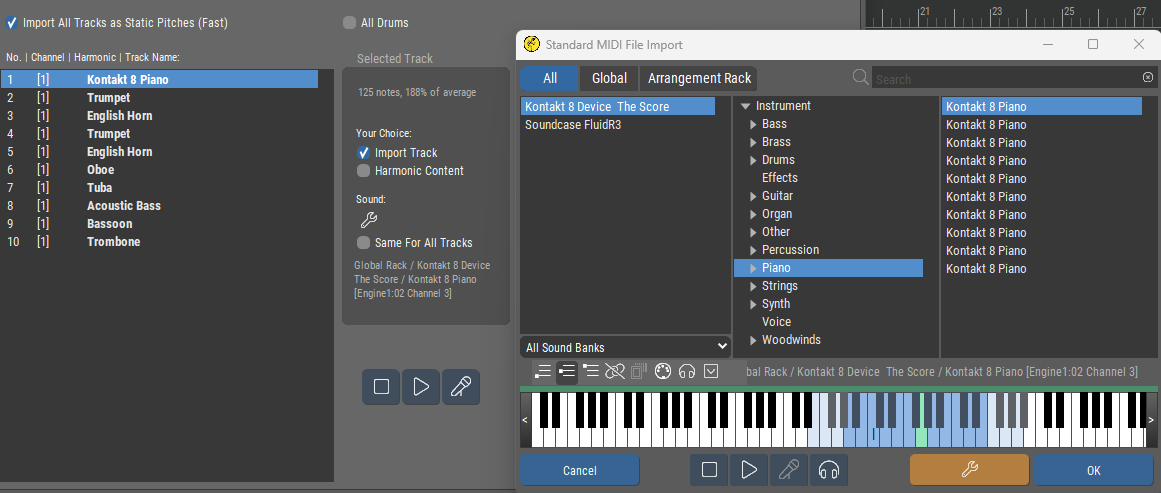 Here, I’ve loaded a 10-track MIDI ensemble from The Score VST into Synfire’s import screen.
You can already see where it goes wrong—Synfire has already assigned instruments via a rack.
Under “Channel” in the import screen, they all say [1], but they should be 1 through 10.
Also, the routing for channel 1 is playing the input for the entire ensemble, whereas it should be the first instrument in the ensemble, which consists of 10 instruments.
In the DAW, all you need to do is set the 10 MIDI channel numbers correctly
The device description was created with 10 MIDI channels, and I don’t see any other way to get this working through Synfire right now.
A new configuration is needed in Synfire to adjust the import screen and the routing.
Fri, 2026-07-03 - 21:54 Permalink
The device for The Score needs 10 fixed channels (the sampler type of device) with sound properties assigned for each channel. If you use this device you can pick the channel per imported track
Fri, 2026-07-03 - 23:03 Permalink
It's also worth checking the raw midi file has the right midi channels. When I've exported a single midi file containing multiple tracks using ableton, the file had everything set to channel 1. Took me ages to work that one out as I thought it was synfire making a mistake.